Reserch “Provide a step-by-step CLI guide to deploy a local static website (HTML/CSS/JS) to GitHub Pages. Include the exact Git commands to initialize the repo, commit files, link it to GitHub, and set up the deployment branch.” Turned.
Plan: Data Analyst Portfolio Website (Simple Static - Modern Dark/Tech)
This plan outlines the creation of a high-impact, single-page portfolio website tailored for a Data Analyst
using pure HTML, CSS, and JavaScript.
Objective
Build a professional, visually stunning one-page portfolio that highlights data projects, technical skills,
and professional experience without the overhead of a framework.
Key Files & Context
- index.html: Main structure and content entry point.
- style.css: Theme definitions (Dark/Tech palette) and layout.
- script.js: Interactivity, smooth scrolling, and scroll-reveal animations.
- assets/: Directory for images, icons, and PDFs (resume).
Implementation Steps
Phase 1: Foundation & Theming
1. Initialize Project: Create the directory structure and basic files.
2. Define Global Styles:
- Set up style.css with CSS variables for a deep navy (#0a192f) background and neon cyan (#64ffda)
accents.
- Implement a clean typography system using Google Fonts (e.g., 'Inter' and 'JetBrains Mono').
Phase 2: Content Structure (HTML)
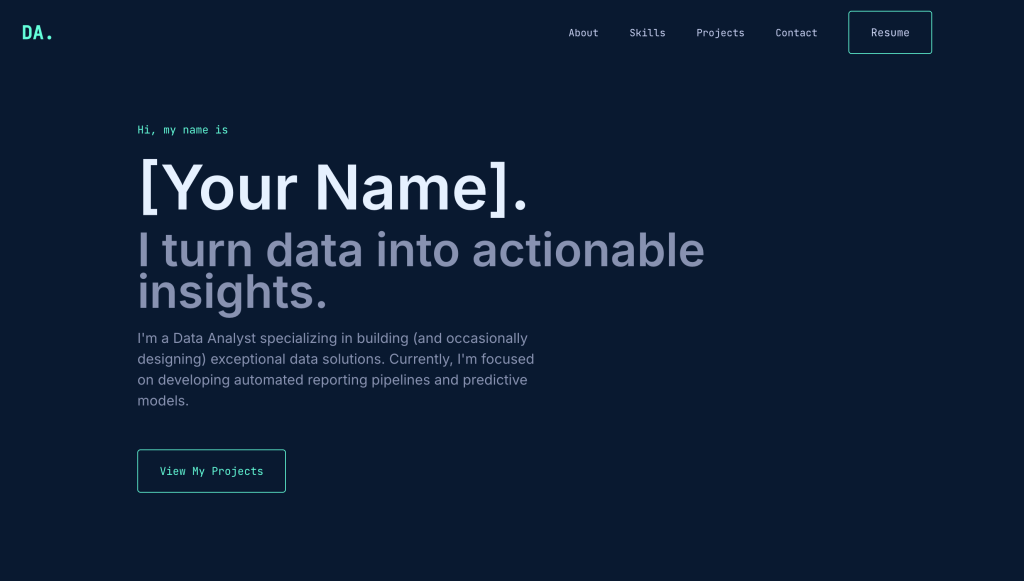
1. Navigation: Minimalist header with links to About, Skills, Projects, and Contact.
2. Hero Section:
- "Name | Data Analyst | Turning raw data into insights."
- Add a clear Call to Action (CTA) button to "View Projects".
3. Skills Section:
- Use a flexbox/grid layout to display skill cards (SQL, Python, Tableau, Machine Learning).
4. Project Gallery:
- Create a responsive grid of project cards.
- Each card includes: Image placeholder, Title, Description, Tech Tags, and GitHub link.
Phase 3: Interactivity (JS & CSS)
1. Smooth Scrolling: Implement smooth scroll behavior for navigation links.
2. Scroll Reveal: Use the Intersection Observer API in script.js to trigger fade-in animations as the user
scrolls.
3. Responsive Design: Use Media Queries in style.css to ensure a perfect mobile experience.
Phase 4: Deployment
1. GitHub Pages Setup:
- Push the code to a GitHub repository.
- Enable GitHub Pages in Settings > Pages (selecting the main branch and root folder).
Verification & Testing
- Visual Audit: Check all colors and fonts against the "Modern Dark/Tech" theme.
- Link Check: Ensure all project and social links open in new tabs (target="_blank").
- Performance: Optimize image sizes and minify CSS/JS if needed for speed.
- Responsiveness: Test on mobile, tablet, and desktop viewports.
อย่าลืมทำการ save plan เก็บไว้ แล้วจากนั้น ถ้าเรา OK แล้วก็สั่งให้ run ได้เลยยยย ลุยยย 🔥 หลังจากที่เสร็จสิ้นแล้วให้เราลอง code . เพื่อปิด vscode ดู เป็น program สามัญประจำบ้านเลย แนะนำต้องมีติดเครื่อง ! จากนั้นทำการ open with live sever ดูว่า web page เราเป็นยังไงง 🤔
Web version แรกจะยังไม่มีอะไร เราสามารถกำหนด specs ให้ได้ เช่น ชื่อ Name , About me, Technical Skills etc., โดยที่เราสามารถไปแก้ไขที่ไฟล์ index.html ของเราได้เลยยยย ซึ่งถ้าหากเพื่อนๆ ยังไม่มีความรู้เรื่อง code สามารถเรียนเพิ่มเติมได้ที่นี้เลยยยMini AI Schoolของ @Toy Data Rockie นี้แหละ ของดี ฟรีๆๆๆ 💯 💯 💯 ✨
3.Deployment ขึ้น Github เท่ ๆ ไว้อวด HR
ก่อนที่เราจะ deploy web ของเราเนี่ย เราต้องมี account ของ github ก่อน !!



Leave a comment